

 EN
 Chinese CN

Secure ERP Access for Suppliers Across Networks
The customer
The customer manufactures electrical equipment and runs a mature ERP system covering warehousing, sales, purchasing and finance. As its supplier network grew, the company needed to let upstream suppliers access the ERP through a browser to confirm orders, check shipments and reconcile accounts — without exposing the server or rewriting any ERP code.
The challenge
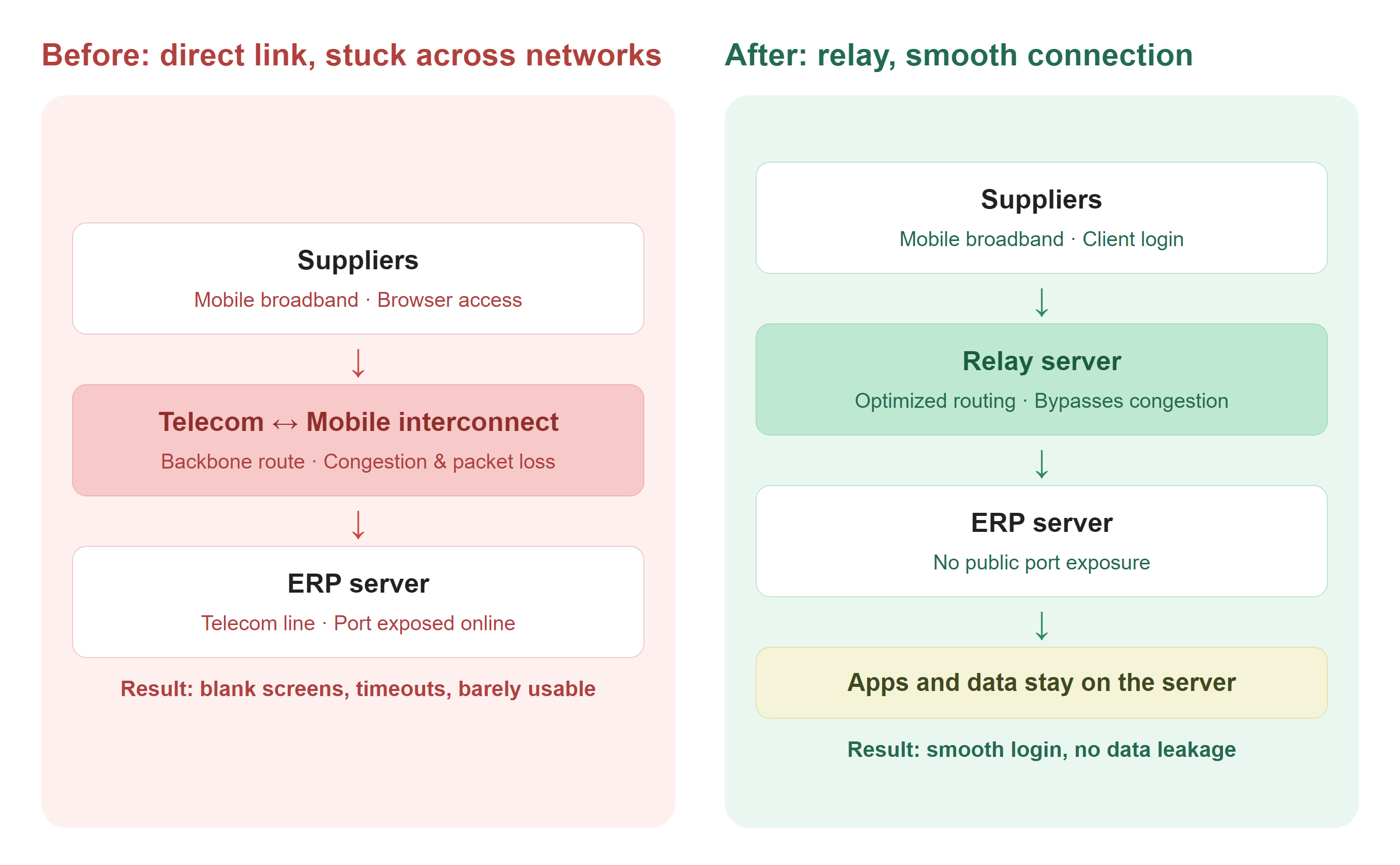
The original setup opened an external port on the ERP server and published its public IP. Suppliers connected directly over the internet. The company used a dedicated telecom line; suppliers were on mobile broadband. Traffic had to cross congested carrier interconnect points, so pages timed out, screens went blank and the system was nearly unusable.
The open port also put the ERP server within reach of anyone on the internet — a clear risk of attacks, data loss and ransomware. Cross-carrier links were unstable and hard to troubleshoot, every new supplier meant more firewall work, and browser access offered little control over screenshots, downloads or clipboard use.
Why direct access failed
The ERP was not the problem. The bottleneck was the carrier-to-carrier link. Point-to-point access pushed all traffic onto that unstable path with no relay or optimization. Slow access plus an exposed port made the system both unreliable and unsafe.
The AQCould solution
AQCould replaced direct access with a three-layer architecture. Suppliers connect through a relay server, which reaches the ERP server inside the company. Only screen updates and input commands travel over the network; the ERP port stays closed to the public internet.
| Layer | Component | Role |
|---|---|---|
| Client | Suppliers on mobile broadband | Log in through the AQCould client; only screen and input commands are sent |
| Relay | AQCould relay server | Optimizes cross-carrier routing and bypasses congested interconnect points |
| Server | AQCould server + ERP server on the telecom line | Two separate machines: the AQCould server handles access, the ERP server stays untouched |
What makes it work
- Relay server. Routes traffic around the congested telecom–mobile interconnect, turning "barely opens" into smooth daily use.
- No exposed ERP port. The ERP server sits behind the AQCould server. If anything goes wrong, it affects the AQCould machine — not the ERP.
- Data stays put. Programs and data run inside the company. Suppliers only see the screen; nothing can be copied or downloaded.
- Simple account control. Each supplier gets an individual account with least-privilege app access — no network changes needed.
Implementation
Six steps from discovery to go-live:
| Step | What we did | Outcome |
|---|---|---|
| 1. Discovery | Reviewed ERP deployment, user numbers and network topology | Identified the bottleneck and security needs |
| 2. Server setup | Installed the AQCould server on a separate machine and published the ERP browser as an app | ERP keeps running untouched |
| 3. Relay setup | Deployed the relay server to optimize cross-carrier routing | Mobile-to-telecom path opened up |
| 4. Accounts | Created supplier accounts and assigned ERP app permissions | Least-privilege access |
| 5. Client testing | Suppliers installed the client and logged in to the ERP | Smooth cross-network access |
| 6. Go-live | Closed the old external ports and moved into production | Secure, stable, easy to maintain |
Results
- Fast access. Suppliers log in smoothly from any carrier; timeouts and blank screens are gone.
- Stronger security. No public ERP port, unified accounts and auditable sessions.
- No data leakage. Apps and data stay on the server; files, clipboard and peripherals can be controlled.
- Less IT work. Adding a supplier means creating an account, not reconfiguring firewalls. The architecture is ready for more suppliers and sites.
AQCould solved security and usability first, with cross-network access as a direct result. Any company that needs to open an existing application to external users over unreliable carrier links can reuse the same approach.

